


App Support
Pre-authorisation is a temporary hold placed on your payment card before you start an EV charging session. When you plug in and begin charging, the charger sends a request to your bank to reserve a set amount of funds. This isn’t a charge; it simply confirms that your card is valid and that you have enough balance for the session. Once you finish charging, you’re only billed for the actual amount of energy used, and any unused portion of the hold is released by your bank.
- Download and open the Exploren app. Available Google PlayStore or Apple App Store
- Log in or create an account
- Tap 3 dash top left corner
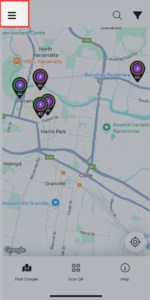
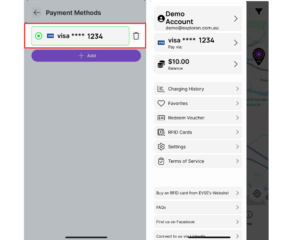
4. Select ‘Pay via’
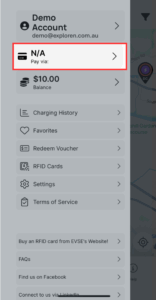
5. Select the add button
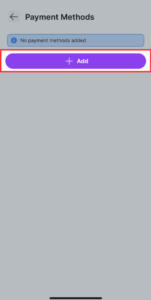
6. Add your card details
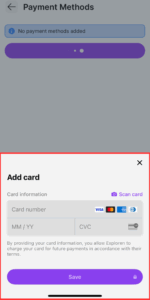
7. Your card is now connected to your account. You should see your card details on the screen. If you would like add a new card or delete a card, please revisit this menu.
Depending on the message that you receive on the app’s screen, you may have an unpaid charging session or you may not have access to that particular charging station.
Call our technical support at 1300 755 087 or via email at [email protected]
Tap the Menu icon, top left corner of the app, then tap your account name and tap ‘Remove account’.
Call our technical support at 1300 755 087 or via email at [email protected] – Charger has not been enabled yet OR this charger is private and will not allow public use.
Account balance and charging history can be viewed in the app menu under ‘Balance’ and ‘Charging History’
- Using the RFID card:
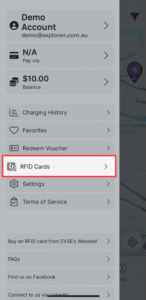
- To register an RFID card on the Exploren app, select “RFID Cards” on the drop-down menu (top left corner) in the app, and follow the instructions.
- Swipe the RFID card on the RFID reader to start the charge point.
- To stop the charging session, swipe the RFID card again.
1.On the Exploren App, select the QR code button
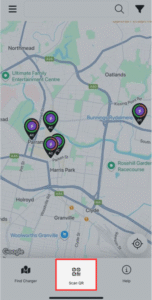
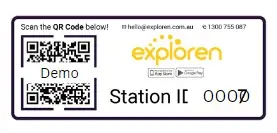
2.Scan the QR code located on the charger’s Exploren sticker.
3. Check the tariff screen and read tariff conditions then start charging.
Driver Support
Pre-authorisation is a temporary hold placed on your payment card before you start an EV charging session. When you plug in and begin charging, the charger sends a request to your bank to reserve a set amount of funds. This isn’t a charge; it simply confirms that your card is valid and that you have enough balance for the session. Once you finish charging, you’re only billed for the actual amount of energy used, and any unused portion of the hold is released by your bank.
Watch our short video for instructions on how to charge with the Exploren app, RFID card or credit card:
Charging times vary greatly depending on your vehicle’s battery size, charging speed and the power of the charger. For example, some vehicles can only charge at a maximum AC speed of 7kW, while others can charge at 11kW. Similarly, DC charging speeds vary greatly by vehicle, with some maxing out at 150kW while others at 280kW.
It is important to note, your vehicle will only charge as fast as the battery can handle. If your vehicle can draw a max DC speed of 150kW and you plug into a 200kW charger, you will only charge at a speed of 150kW.
If you want more information about your specific vehicle’s charging speeds, check our EVSE’s car guide for more information.
You can use any RFID card ISO14443 standard to start charging on Exploren. Our RFID cards can also be set up for use on other network chargers for your convenience.
In some basement carparks – your mobile device may not have reception which means you can’t activate the charger with your phone at that time, here are some alternatives to getting that session started!
Option 1: RFID CARDS
You can order an RFID swipe card from EVSE here:
Once you get it, you will see some digits on your RFID card like shown in the red box below:

You will simply need to open up your Exploren app and enter this RFID card under the account you create through the following steps:
1.Open the Exploren app. Press the button with 3 lines in the top left corner
2. Press ‘RDIF Cards’ in the menu
3. Press ‘Add RFID Tag Manually’
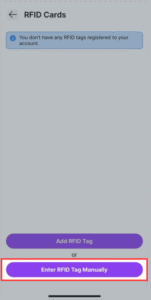
4. Enter RFID Tag ID which can be found on the tag. Enter a nickname for the tag (eg. Kevin’s RFID) then select ‘Add RFID Tag’.
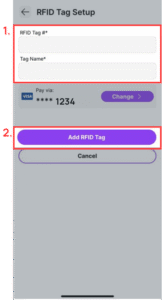
Please ensure the correct payment method is selected as this will be billed for your charging sessions.
5. Your RFID card is now connected. When arriving at a charging station, tap your RFID on the symbol  to start the charging session.
Option 2: Go to an area with reception
If you do not have the time to wait for an RFID card, you can still charge your vehicle.
- Plug in your car to the charger (the car and the charger will lock the cable the cable will be safe)
- Take note of the station ID which is printed on the QR code sticker, should be a four-digit number like 0123
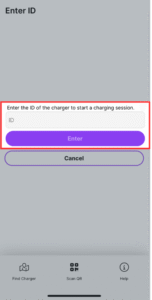
- Go to an area where you have reception then click on the QR code scanner and select “Enter ID manually” as shown in the screenshot.
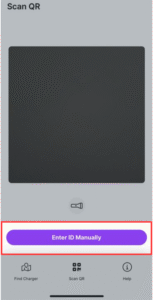
4. Put the station ID noted previously into the box then select enter.
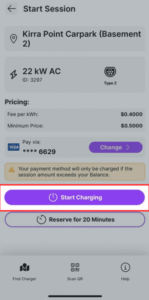
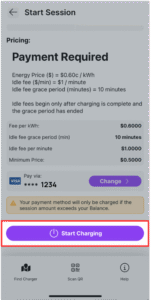
5. You should now see the details for the charging station. Select ‘Start Charging’ on this page.
Unfortunatley we are unable to assist with this matter – the owners of the chargers would need to create an EV-exclusive parking bay & manage the drivers who do not comply.
Go to ‘Menu’ in the app, top left corner, go to RFID Cards and remove your lost card. You then can self-register an RFID card in the same menu.
Call our technical support at 1300 755 087 or via email at [email protected]
Some AC chargers available on the Exploren network will require drivers to bring their own cable. All current EV’s on the Australian market will use a Type 2 to Type 2 cable; however, older models (pre-2018) may have a type 1 connector and will require a Type 2 to Type 1 cable.
No DC chargers will require drivers to bring their own cables.
General
For EV drivers: the price to charge at an Exploren charger depends on the location and speed of the charger. AC chargers range from free – $0.55/kWh (on average), and DC chargers range from $0.55/ $0.75/ kWh (on average).
Many Exploren chargers are operated by third parties, and Exploren does not control the tariff.
For businesses looking to utilise Exploren on their chargers, you can find pricing here, or get in touch via 1300 755 087 or [email protected] for pricing to suit your needs.
This acronym stands for Open Charge Point Protocol which is an application for communication between electric vehicle charging stations and a central management system (the charging station network). OCPP-compliant solutions give a longer life to your charging system by allowing the open source standard to be setup to run any compliant software. OCPP is the globally recognized best practice due to the ease of implementation and open source nature of the platform. Gain the benefits of OCPP compatible hardware and software so that you have the flexibility to choose providers, make charging stations publicly accessible if you choose to and report on all your EV charging data in one location with a quality customer experience.
Operators
Contact [email protected] and we can adjust this for you.
Check out our tariff guide to get an overview of the options available.
Call our technical support at 1300 755 087 or via email at [email protected]
Technology
Yes. Exploren runs on Australian servers to provide superfast speeds with a 99.9% network uptime guarantee. Better yet, we’re compliant with all Australian data protection laws to ensure the safety of our users. We take data security seriously with protective measures in place.
Exploren software is future-proofed for this vital functionality, which will become even more popular in the coming years. Load management refers to the automated and dynamic control of energy sent to your EV chargers. You can limit the total electrical energy used by a group of chargers to avoid costly power capacity upgrades and usage tariffs. This can be completed while multiple vehicles are charging. Alternatively, your charging setup may be more powerful than the capacity of the EV being charged. Prioritized charging can be set for vehicles in the fleet with a slower rate of charge or a need to be back on the road sooner.
This acronym stands for Open Charge Point Protocol which is an application for communication between electric vehicle charging stations and a central management system (the charging station network). OCPP-compliant solutions give a longer life to your charging system by allowing the open source standard to be setup to run any compliant software. OCPP is the globally recognized best practice due to the ease of implementation and open source nature of the platform. Gain the benefits of OCPP compatible hardware and software so that you have the flexibility to choose providers, make charging stations publicly accessible if you choose to and report on all your EV charging data in one location with a quality customer experience.